
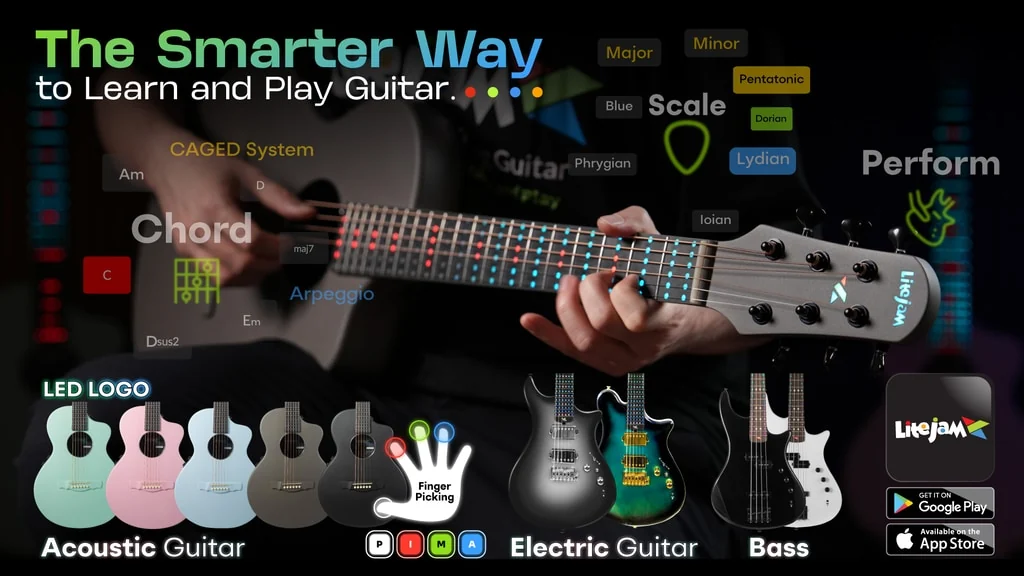
The LiteJam Neo A1 is a carbon-fibre acoustic-electric guitar with 132 RGB lights in its fretboard and an app that can display chords, scales, progressions, strumming directions, and fingerpicking patterns. Its best idea is not simply showing a beginner where to place the fretting hand. It also tries to answer the harder question: what should the picking hand do next, and when?
That makes the Neo A1 most interesting for visual learners who can form a few chords but struggle to turn them into a complete, rhythmic song. I see it as practice scaffolding rather than a shortcut. Used deliberately, the lights could make two-hand coordination easier to understand; left on forever, they could become something a player needs to outgrow. For the right beginner or guitar teacher, that is still a far more specific reason to consider the LiteJam Neo A1 campaign than the novelty of a glowing fretboard alone.
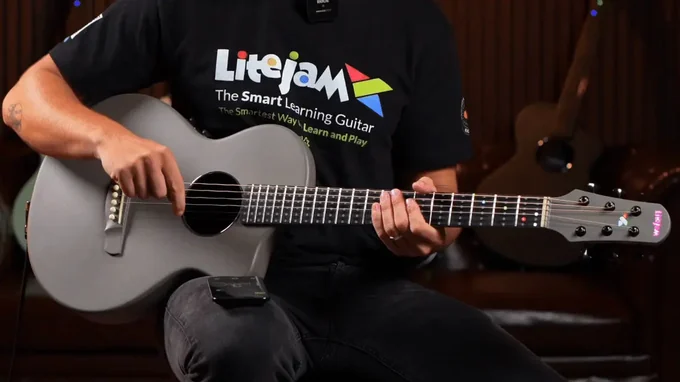
The Neo A1 puts its visual prompts directly on a playable acoustic-electric guitar. Image: LiteJam/Kickstarter.
LiteJam Neo A1 in One Minute
The Neo A1 combines a 21-fret acoustic-electric instrument with a connected learning system. The fretboard uses coloured LED dots to indicate notes and fingers, while the LiteJam app controls modes for chords, scales, arpeggios, progressions, strumming, and fingerpicking. It can also be played as a conventional guitar when the guidance is not needed.
The project specifications list a carbon-fibre composite body, Bluetooth connectivity, USB-C charging, a piezo pickup, onboard EQ, and an approximate weight of 1.8 kg (4.0 lb). The carbon construction should make the A1 physically different from a conventional wood acoustic, but claims about durability, comfort, and resistance to environmental changes remain LiteJam’s claims until independently tested.
What separates this guitar from a basic light-up fretboard is the connection between a chord progression and the player’s right hand. A progression can carry a tempo and time signature, while the interface presents downstrokes, upstrokes, or named picking-finger sequences. Instead of seeing only “play C major,” the learner can see where the chord goes and how its rhythm is supposed to unfold.
The Clever Part Is Teaching the Picking Hand
Many beginner tools concentrate on the fretting hand because chord shapes are easy to represent as dots. Yet a clean C-to-G transition is only half a song. The other hand has to keep time, hit the intended strings, and maintain a pattern while the chord changes underneath it.
LiteJam’s colour system gives each fretting finger a colour: red for the first finger, green for the second, blue for the third, yellow for the fourth, and white for an open string. Unlit positions can indicate strings or notes that should not be played. The picking-hand display extends that visual language to the traditional p-i-m-a labels for thumb, index, middle, and ring fingers.
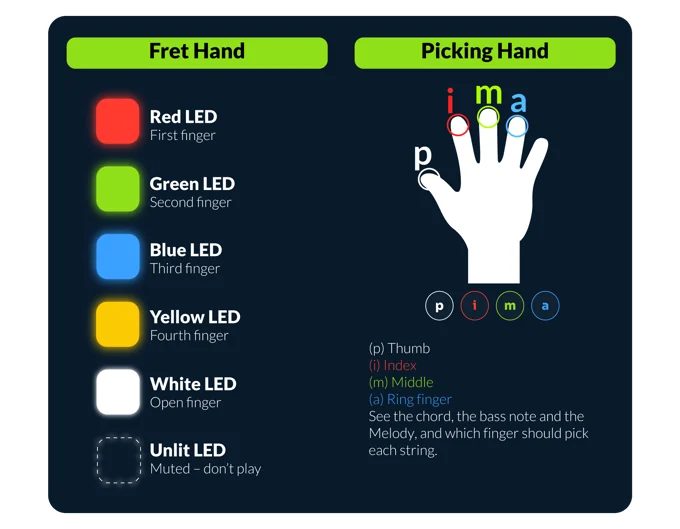
The same colour vocabulary links fret positions with individual picking fingers. Image: LiteJam/Kickstarter.
I like this design because it reduces a specific translation burden. A learner looking at tablature normally has to convert numbers into fret positions, remember which left-hand finger is sensible, then apply a separate rhythmic or fingerstyle pattern. The Neo A1 tries to put those instructions into one visual sequence on the instrument and in the app.
That does not mean the guitar can make the player’s fingers move correctly. It can show an intended route, but pressure, muting, timing, tone, and relaxed technique still come from attentive repetition and, ideally, feedback from a teacher. The lights explain the map; they do not walk the route for you.
From Down-Up Arrows to Fingerstyle Patterns
In strumming mode, the app uses downward and upward arrows to represent stroke direction. The demonstrated patterns range from steady downstrokes to a combination of downstrokes and alternating motion. Tempo controls and real-time fretboard cues are intended to keep the pattern aligned with chord changes.
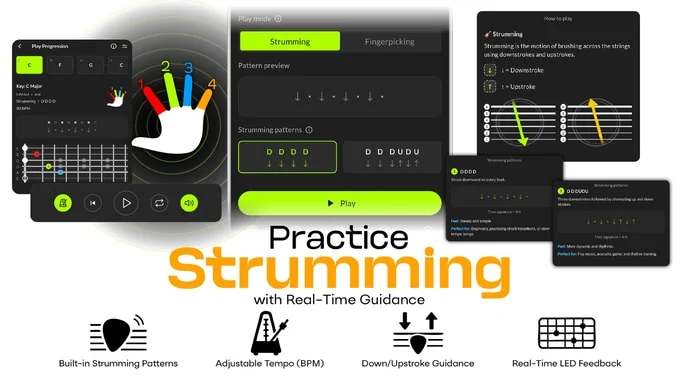
Strumming mode combines chord positions with direction and tempo cues. Image: LiteJam/Kickstarter.
This is useful for the beginner who freezes during a chord change and restarts the strumming hand after every mistake. A repeating visual pulse can make it clearer that rhythm continues through the transition. I would treat the simplest pattern as a coordination drill, then reduce reliance on the display once the movement feels predictable.
Fingerpicking mode is more ambitious. LiteJam presents PIMA and PAMI-style patterns, static and alternating bass options, and per-chord pattern choices. The app imagery also shows a progression builder in which different chords can carry their own picking setup.
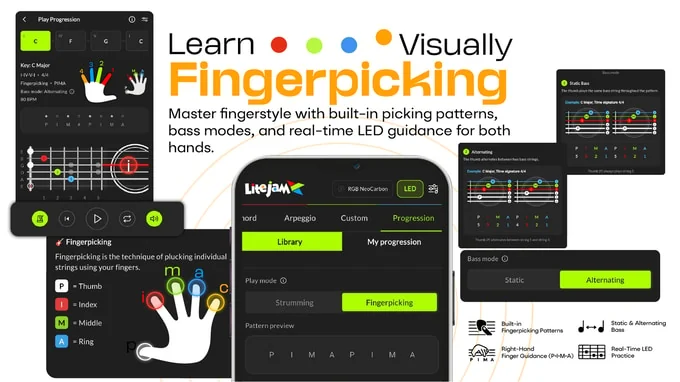
Fingerpicking mode visualises the thumb-and-finger order alongside the chord progression. Image: LiteJam/Kickstarter.
For someone learning a first fingerstyle arrangement, that could be the A1’s strongest mode. The player can slow the sequence down, identify which finger owns each note, and focus separately on a static thumb pattern before attempting alternating bass. These features are presented by LiteJam and have not yet been independently assessed for timing accuracy or teaching effectiveness, so I would view them as a promising method rather than a proven faster route to mastery.
Why Timing Matters as Much as Chord Shape
The demonstration shows chord progressions carrying a tempo and time signature, with visual cues changing as the progression advances. That matters because a learner’s real problem is rarely remembering four isolated shapes. It is moving between them without losing the beat.
The app also appears to let a player choose strumming or fingerpicking treatment for a progression and save custom patterns. That changes the exercise from “memorise these chords” into “practise this musical sequence.” It is a subtle distinction, but it is the reason the A1 feels more purposeful than a fretboard that merely lights every note in a scale.
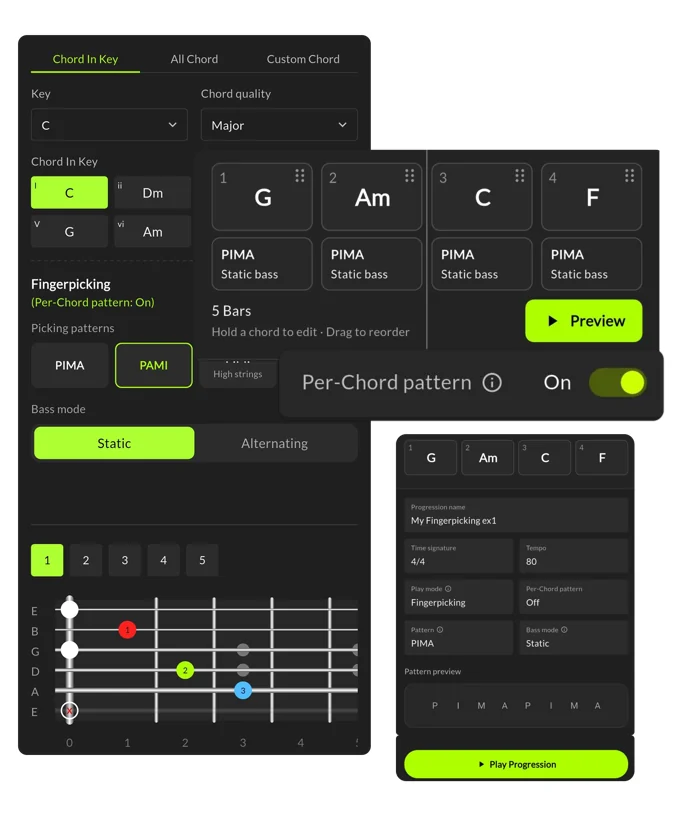
The progression builder connects chord order, tempo, bass mode, and picking pattern. Image: LiteJam/Kickstarter.
What the 132-Light Fretboard Can Show
The project lists 132 RGB dots across the 21-fret neck, plus separate illuminated LiteJam branding. Beyond chord shapes, the system includes scale, arpeggio, chromatic, and technique visualisations. Custom colours and patterns broaden the concept from basic instruction to practice and performance displays.
The number of modes is less important than how a player uses them. A beginner might illuminate only the notes of a C major chord. An intermediate player could display a scale across the neck, select particular strings, and practise a short pattern at a controlled tempo. A teacher could use the colours to introduce a shape to several students, switch the lights off, and ask them to reproduce it from memory.
That last step matters. Visual guidance is most valuable when it creates a bridge to independent playing. Some guitarists will prefer to build the ear-to-hand connection without illuminated prompts, and experienced players who already know the fretboard may find the learning modes unnecessary. The A1 makes the strongest case for people who benefit from seeing movement before internalising it.
A Smart System Inside a Real Acoustic-Electric
The Neo A1 is intended to remain a functional guitar when the smart layer is not in use. Its rounded cutaway body is moulded from a carbon-fibre composite, and the project lists a 618 mm scale length, 43 mm nut width, and approximate 1.8 kg weight. A piezo pickup and onboard tone and volume controls allow connection to external audio equipment.
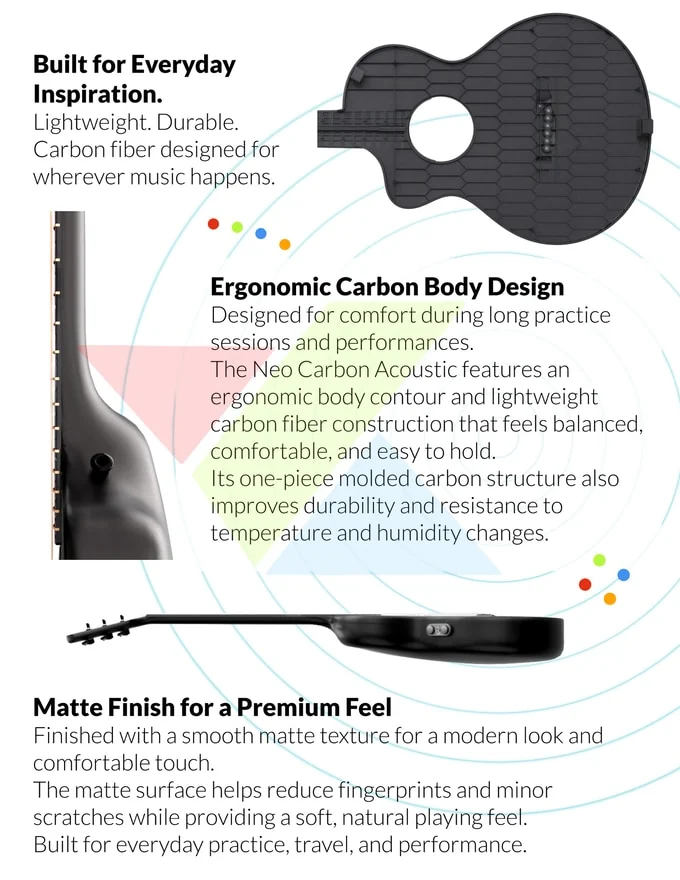
The moulded carbon-fibre body gives the Neo A1 its compact acoustic-electric form. Image: LiteJam/Kickstarter.
I would not assume that carbon fibre automatically means better acoustic tone than wood. It offers a different construction approach, and LiteJam says the one-piece moulded body improves durability and resistance to temperature and humidity changes. Tone, neck feel, fret finish, amplified noise, and long-session comfort are precisely the qualities that need independent evaluation on a final instrument.
USB-C handles charging, while Bluetooth links the guitar to the LiteJam app on iOS and Android. An exact A1 battery runtime is not consistently documented in the available material, so it should not be treated as settled. LED response latency and offline app behaviour are also open questions. Those details will matter more than an extra visual mode if the connection interrupts practice or if core features depend on continued software support.
Who Will Get the Most From It?
The clearest fit is a visual beginner practising at home. Imagine a player who can form four open chords but stops every time the right hand and left hand fall out of sync. The A1 can keep the chord positions, stroke direction, and tempo in one place, allowing that player to repeat a short progression instead of juggling a chart, metronome, and fretboard.
The second fit is an early fingerstyle learner. A static-bass exercise can isolate the thumb while coloured prompts assign melody notes to individual fingers. Once that pattern is stable, alternating bass increases the coordination challenge. The value is not that the guitar removes the work, but that it makes the work easier to divide into understandable pieces.
The third fit is a teacher. Colour coding can provide a common language during a lesson: red finger here, thumb on this bass string, then index-middle-ring in sequence. The teacher can demonstrate with the lights, turn them off, and check whether the student retained the movement. That controlled removal of guidance is how I would want the system used.
Players who already navigate the neck confidently, learn mainly by ear, or want a traditional acoustic response may see less value. The illuminated performance effects might still be fun on stage, but they are not the core reason I would choose this guitar.
Learning Aid or Light-Up Crutch?
The central trade-off is not difficult to spot. A visual system can reduce early confusion, yet permanent dependence on it would work against fretboard recall and listening. This does not make the LEDs a gimmick; it makes practice design important.
My preferred approach would be gradual withdrawal. Start with full colour and timing prompts. Next, keep only the rhythm cue. Then play the same progression with the fretboard dark. Finally, move the exercise to another guitar. If the skill transfers, the lights have done their job.
This is also why the Neo A1 should not be sold in the reader’s mind as a miracle shortcut. It cannot replace ear training, careful timing, or corrections to poor hand position. Its more credible promise is narrower: it can make an invisible coordination problem visible enough to practise.
Is the LiteJam Neo A1 Worth Backing?
I think the Neo A1 is worth considering if you are a visual learner who wants to progress from isolated chord shapes into rhythmic songs or beginner fingerstyle, or if you teach players who respond well to colour and movement. The combination of fretboard guidance and right-hand patterns gives it a more convincing educational purpose than decorative LEDs alone.
I would be more cautious if acoustic tone, mature offline software, measured LED latency, or long-term app support is the deciding factor. Those areas need independent testing and clearer documentation. As with any crowdfunding product, the final hardware, software, fulfilment, and timing can change, so review the current campaign details before making a pledge.
If the two-hand teaching approach matches how you learn, visit the LiteJam Neo A1 campaign and examine the latest specifications and terms.
Disclosure: This article contains an affiliate link. We may earn a commission at no extra cost to you.
Frequently Asked Questions
What do the 132 RGB lights show?
They can mark notes, chord shapes, scales, arpeggios, finger assignments, and technique patterns. The app also connects those fretboard positions to progression, strumming, and fingerpicking modes.
Can the LiteJam Neo A1 be played as a normal guitar?
Yes. It is presented as an acoustic-electric instrument that can be played without illuminated learning guidance, with a piezo pickup and onboard controls for amplified use.
How does the right-hand guidance work?
Strumming mode uses downstroke and upstroke indicators tied to a progression and tempo. Fingerpicking mode uses p-i-m-a finger labels, colours, and pattern sequences, with static or alternating bass options shown in the app.
Who is the Neo A1 best suited to?
Its strongest fit is a visual beginner working on rhythm and chord transitions, an early fingerstyle learner, or a teacher who wants to demonstrate both hands with consistent colour cues.
What remains unverified?
Independent testing is still needed for acoustic and amplified tone, LED latency, exact battery runtime, offline app behaviour, long-term software support, durability, and final production quality.