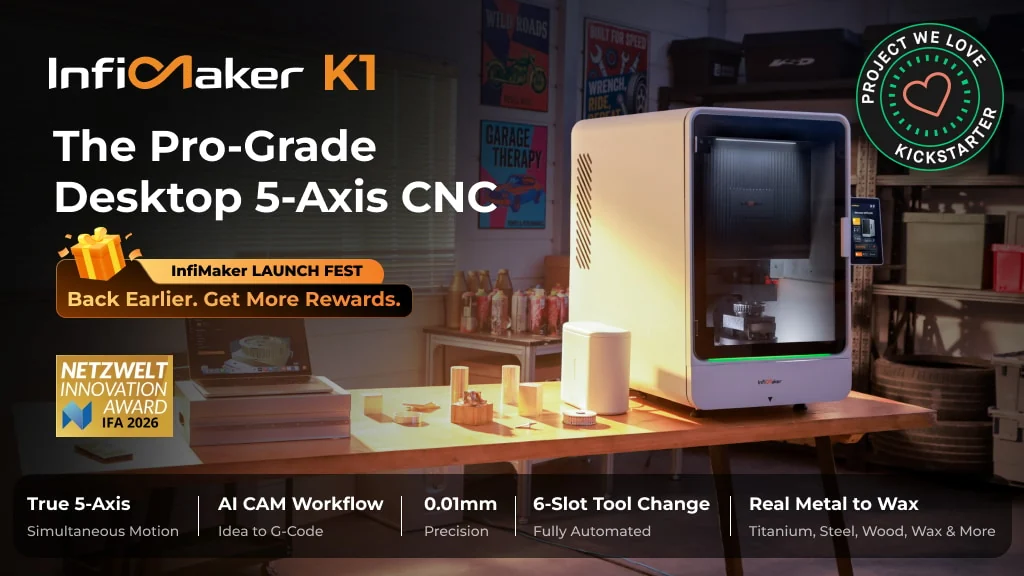
The InfiMaker K1 is a compact, enclosed CNC machine built to cut complex parts with true simultaneous five-axis motion. Its most important idea, however, is not the extra rotary movement. It is the attempt to combine probing, tool changes, material recognition, toolpath generation, simulation, and machine control into one workflow that is approachable without years of five-axis CAM experience.
That makes the K1 most interesting for product designers, robotics teams, jewellery makers, prototype studios, advanced makers, and small workshops that repeatedly machine features on several faces of a part. If your work is mainly signs, flat panels, pockets, or other 2.5D jobs, a simpler three-axis machine will usually be the more rational tool. For genuinely multi-sided parts, though, fewer fixtures and fewer opportunities to lose alignment could make the K1 a compelling machine to consider.
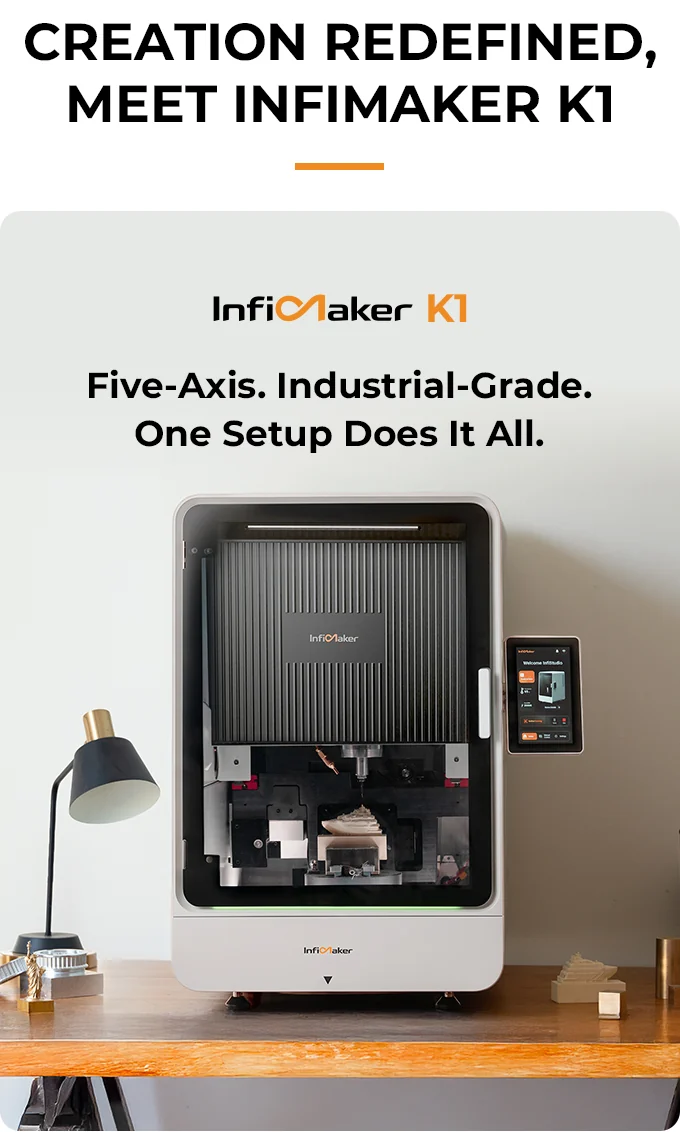
The K1 packages its spindle, rotary table, enclosure, and touchscreen into a compact vertical machine.
The K1’s real bet is the workflow, not the axis count
Five-axis CNC is difficult for reasons that extend far beyond making five motors move. A useful system also needs to understand the stock position, tool length, rotary geometry, safe approach angles, fixtures, collisions, feeds, speeds, and the post-processor that converts a CAM plan into instructions the controller can execute.
InfiMaker’s answer is to treat the machine and its software as one product. The K1 combines an enclosed vertical structure with a rotary worktable, a wireless probe, an automatic tool changer, a camera, and InfiStudio software. The software is designed to accept common 3D formats, generate or import a model, prepare toolpaths, simulate the job, and send it to the machine. Experienced users can also bring G-code from third-party CAM software rather than depending entirely on the guided workflow.
I think that escape hatch matters. Automation is valuable when it removes repetitive setup, but a machine intended for serious prototyping should not become useless when a job exceeds the assumptions of its simplified software. Support for an external CAM path gives the K1 a better chance of serving beginners and experienced machinists without pretending both groups need the same interface.
What simultaneous five-axis machining changes
A three-axis CNC moves a cutter along X, Y, and Z. Indexed 3+2 machining adds rotary positioning, but the part is normally rotated to a fixed angle before a three-axis cutting operation begins. In simultaneous five-axis machining, the linear and rotary axes can move together while the cutter follows the surface.
That difference matters for freeform curves, compound angles, undercuts, and parts that would otherwise need several fixtures. Imagine a robotics engineer making a compact joint housing with mounting holes on three faces and a curved cable channel around one side. On a three-axis machine, the part may need to be removed, re-clamped, re-zeroed, and checked at every orientation. Each setup consumes time and creates another opportunity for alignment error. The K1’s rotary table is intended to keep that part in one coordinate system while the cutter approaches it from several angles.
The official specification lists a five-axis work envelope of 120 × 120 × 120 mm, or about 4.7 inches on each side. Three-axis work expands to 220 × 150 × 150 mm, while the stated 3+2 envelope is 170 × 150 × 150 mm. The B axis is listed from -30 to 110 degrees, and the C axis rotates continuously through 360 degrees. Those dimensions favour compact, intricate parts rather than large panels or moulds.
Hardware designed around one setup
The K1 uses a 1,500 W spindle rated up to 20,000 RPM. InfiMaker lists linear-axis repeatability of 0.01 mm, rapid movement up to 4,500 mm/min, and cutting feed up to 2,500 mm/min. These are manufacturer specifications, so they should be treated as targets rather than substitutes for independent accuracy, thermal-drift, and endurance testing.
The structural design is more meaningful than the headline speed. The machine uses a cast one-piece bed and an inverted gantry intended to keep the centre of gravity low and distribute cutting loads through three support points. At roughly 110 kg, or 243 lb, the K1 has more mass than the word “desktop” might suggest. That weight can help a compact CNC resist vibration, but it also means buyers need a rigid bench and a realistic plan for delivery and positioning.
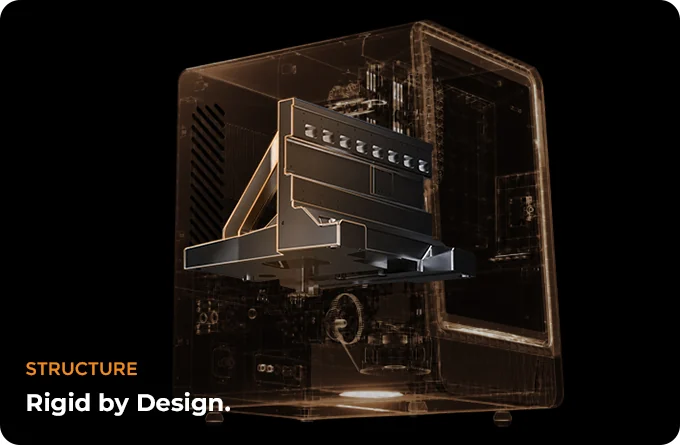
The campaign highlights a cast bed and inverted gantry as the foundation for the machine’s rigidity.
The stated material list ranges from wax, wood, acrylic, and engineering plastics to aluminium, brass, copper, stainless steel, and titanium. A compatibility list does not tell us the practical material-removal rate, tool life, achievable finish, or ideal depth of cut. Hard-metal work will also depend on tooling, coolant strategy, chip evacuation, and sensible feeds. I would therefore read “supports titanium” as a capability claim to investigate for a specific part, not as a promise that the K1 will behave like a large industrial machining centre.
Probing and automatic tool changes reduce setup friction
The K1’s wireless ruby probe is designed to locate the stock and establish the work zero automatically. The same integrated system measures tools and applies real-time tool-centre-point compensation as the rotary axes move. This is exactly the kind of automation that can make five-axis hardware usable rather than merely impressive on a specification sheet.
The official description calls the changer a six-slot ATC with an integrated probe. Some demonstrations describe the practical arrangement as five cutting tools plus the probe. That distinction is worth confirming for any workflow that expects six cutters to remain loaded. Either way, automatic switching between roughing, finishing, drilling, and engraving tools can eliminate several manual interruptions in a complex job.
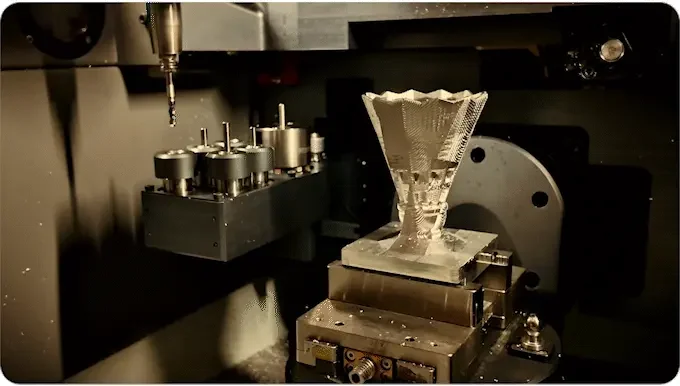
The tool rack and probe sit inside the enclosure beside the tilting rotary worktable.
For a jewellery studio, that could mean roughing a wax or metal form, changing to a small finishing tool, and engraving details without opening the enclosure to reset each tool. For a hardware team, it could mean drilling, contouring, and finishing a prototype enclosure during the same coordinated operation. The benefit is not simply fewer button presses. It is preserving one setup and one reference frame across the process.
InfiStudio is the make-or-break layer
InfiStudio is intended to reduce the specialised CAM work that usually separates a 3D model from a safe five-axis cut. The described workflow can generate a model from text or an image, import STL, STEP, OBJ, 3MF, or GLB files, evaluate manufacturability, choose tools and cutting parameters, create toolpaths, simulate the operation, and check for collision risks.
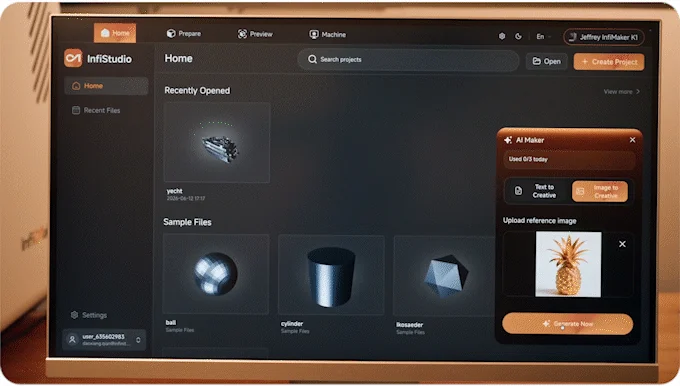
InfiStudio combines model creation and machining preparation in the same software environment.
This is the K1’s boldest promise. Automatic CAM could help a designer who understands the desired geometry but does not want to build every machining operation manually. A small robotics team, for example, could import a STEP file for a sensor mount, scan or define the stock, review the generated operations, and move to a first cut without constructing an elaborate post-processing chain.
The important word is “review.” Five-axis machining puts a great deal of responsibility on toolpath decisions. A collision check, tool recommendation, or automatic feed is only useful when it handles the actual cutter, holder, stock, fixture, and material correctly. Short demonstrations show that InfiStudio can produce working jobs, but they do not establish how reliably it handles unusual geometry, custom tooling, difficult materials, or long machining cycles.
That is why I would evaluate the K1 as a software platform as much as a machine tool. Before committing, I would want clear answers on software licensing, offline operation, update policy, documentation, post-processors, backup and export options, and what functionality remains available if online services change. The ability to run standard G-code from established CAM packages is valuable, but experienced users should still confirm the precise post-processor and controller requirements.
Monitoring can help, but it does not remove process responsibility
The K1 includes a camera-based monitoring system intended to detect tool collisions, tool breakage, workpiece movement, and chip buildup. It also offers job-resume functions following an interruption. These features address real failure modes, especially when a small team cannot stand beside the machine for every minute of a long job.
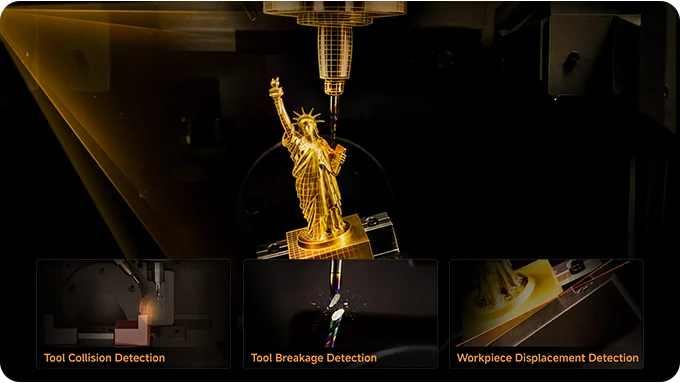
Camera monitoring is designed to flag several visible machining problems inside the enclosure.
I would still treat monitoring as assistance rather than permission for unattended cutting. Cameras cannot replace correct fixturing, tool selection, fire precautions, coolant management, or inspection of a new process. Buyers planning to cut metals should ask exactly which conditions the detection system recognises, how alerts are delivered, and whether the machine pauses automatically or merely reports a suspected problem.
A “desktop” machine that needs a serious workspace
The K1 measures approximately 560 × 700 × 800 mm, or 22.1 × 27.6 × 31.5 inches, and is rated at 2.2 kW. Those numbers deserve as much attention as the five-axis mechanism. A suitable installation needs a bench that can safely support the machine and cutting loads, enough access for the door and service points, an appropriate electrical circuit, and a plan for chips, dust, coolant, and ventilation.
InfiMaker reports noise below 70 dB under specified test conditions. Actual sound will vary with the material, cutter, spindle speed, engagement, bench, and room. The enclosure should help contain debris and sound, but a shared studio or home workshop should not assume every metal-cutting job will be quiet simply because the chassis is enclosed.
The workspace limit also clarifies who benefits. A watchmaker creating a small case, a product designer machining a palm-sized ergonomic prototype, or an engineer producing a compact aluminium bracket can use the rotary volume efficiently. Someone cutting cabinet parts or large flat plates will spend money and floor capacity on axes that contribute little to the job.
Who the K1 fits best
The strongest case for the K1 is repeated multi-face work where setup reduction has measurable value:
- Product and robotics teams making compact housings, joints, mounts, impellers, or mechanisms with features on several faces.
- Jewellery and watchmaking studios producing wax patterns, sculpted forms, small metal components, and detailed engraved surfaces.
- Prototype studios and education labs that want one enclosed platform for teaching or producing complex subtractive parts without assembling a controller, probe, changer, and CAM chain from separate vendors.
- Advanced makers and small custom shops whose projects already exceed simple 2.5D routing and who have the workspace and process discipline for a 110 kg CNC.
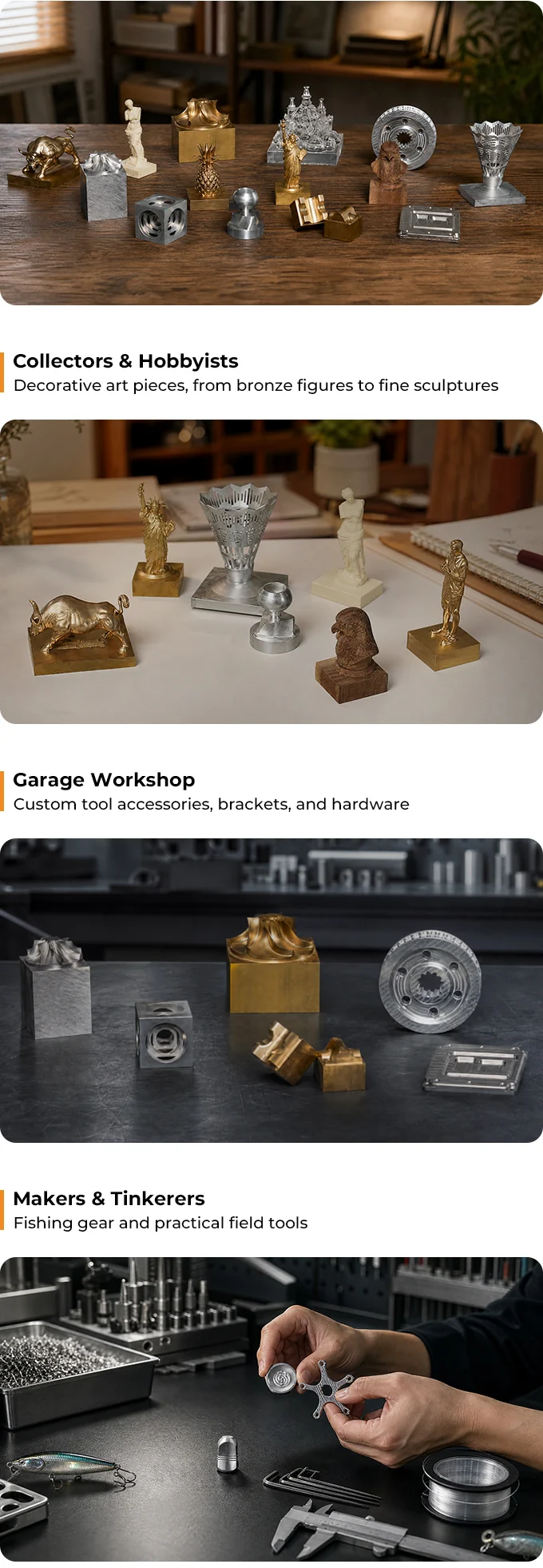
The compact work envelope is aimed at detailed objects, small mechanisms, and multi-sided workshop parts.
The weaker fit is equally practical. If most jobs can be completed from one side, a capable three-axis CNC offers a larger field and a simpler toolchain for the same workshop space. Beginners should also remember that an approachable interface does not remove the need to learn workholding, cutters, feeds, materials, and safe machine operation.
What to verify before backing
Before making a commitment, I would confirm the following against the current campaign terms and written support documentation:
- Whether the six-slot description means five cutting tools plus the probe or six cutters in addition to probing.
- Which InfiStudio functions work offline, how licensing is handled, and whether project and toolpath data can be exported.
- Which third-party CAM packages and post-processors are officially supported.
- The recommended cooling, lubrication, filtration, and chip-management setup for each intended material.
- Electrical requirements, installation clearances, bench loading, included tooling, warranty terms, replacement parts, and local certification documentation.
- Current reward contents, shipping charges, taxes, refund terms, and fulfilment estimates shown on the live campaign.
Crowdfunded machine tools also carry ordinary scale-up and fulfilment risk. A functional demonstration unit is encouraging, but it does not guarantee that production machines, software support, logistics, and service will arrive exactly as expected.
Frequently asked questions
Is the InfiMaker K1 a true simultaneous five-axis CNC?
The K1 is designed for simultaneous movement of its three linear axes and two rotary axes, and it also supports indexed 3+2 and conventional three-axis work. The practical result still depends on the generated toolpath and controller setup.
Can the K1 use Fusion 360 or other CAM software?
InfiMaker says the machine can accept standard G-code generated by third-party CAM software. Buyers should confirm the supported post-processors and workflow for their preferred package before relying on it.
What is the five-axis work volume?
The repeated official specification is 120 × 120 × 120 mm, approximately 4.7 × 4.7 × 4.7 inches. Larger envelopes are listed for three-axis and indexed 3+2 work.
Does the AI workflow replace CAD and CAM expertise?
It is intended to automate model generation and many CAM decisions, but it does not remove the need to inspect geometry, workholding, tools, materials, and simulated toolpaths. Experienced judgement remains valuable when a job moves beyond familiar presets.
Is the K1 suitable for a home workshop?
It may suit a properly prepared home workshop, but its roughly 110 kg weight, 2.2 kW rating, enclosure dimensions, and chip or coolant requirements demand more planning than a typical hobby desktop tool.
Which projects benefit most from the K1?
Compact parts with angled faces, undercuts, sculpted surfaces, or operations on several sides are the clearest fit. Predominantly flat work rarely captures the full value of simultaneous five-axis motion.
Bottom line
The InfiMaker K1 is worth considering when one-setup machining can remove a genuine bottleneck. Its combination of a compact simultaneous-five-axis mechanism, probing, automatic tool changes, camera monitoring, and an integrated CAM environment is more coherent than treating each feature as a separate accessory.
My recommendation is conditional. The K1 makes the strongest case for technically engaged buyers who can use its compact rotary envelope and are comfortable validating software, tooling, workspace, and campaign commitments before backing. Buyers seeking independently proven production uptime or those whose parts are mostly flat should be more conservative.
Visit the InfiMaker K1 campaign to review the current configuration and backing terms.
Disclosure: This article contains an affiliate link. We may earn a commission at no extra cost to you.