I think its strongest audience is easy to identify: people who work from a USB-C laptop or phone, move substantial photo or video files, and want their chosen SSD to remain part of the kit as their storage needs change. The 10Gbps connection is an important limit, and the active fan will not suit everyone, but the combination is unusually coherent. If that matches your workflow, the SHARGE Disk Pro 2 Kickstarter campaign is worth examining.
SHARGE Disk Pro 2 in Brief
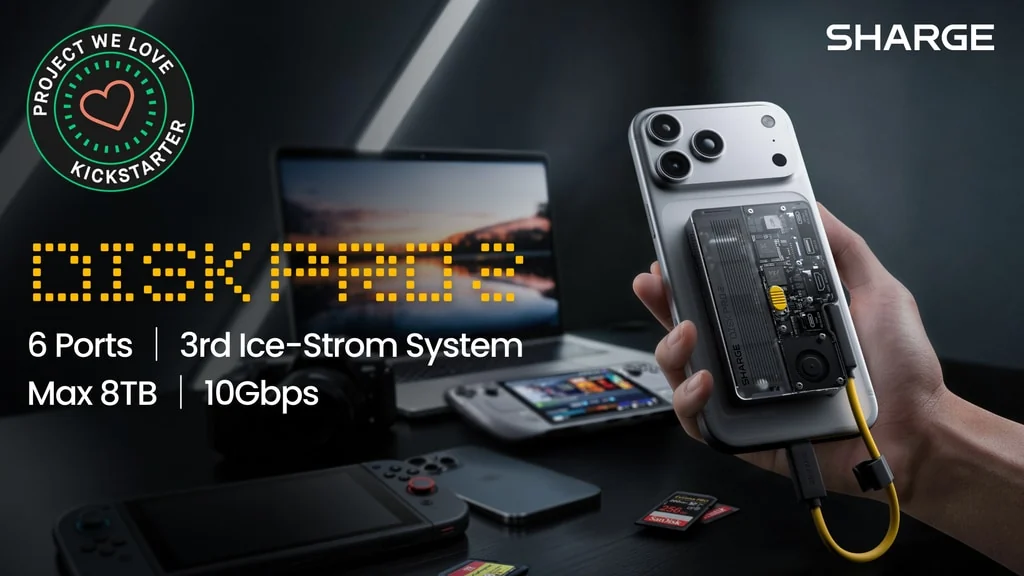
At heart, Disk Pro 2 is an M.2 SSD enclosure that also acts as a compact dock. Its documented connection set includes two USB-C ports, USB-A, HDMI, full-size SD, and microSD. The applicable USB-C data path is rated at 10Gbps, while the power arrangement is described as accepting up to 100W and delivering up to 80W to the connected host.
That layout gives the product a clearer identity than a typical pocket hub. The SSD is not an accessory dangling from the dock; it is built into the same transparent, roughly credit-card-size chassis. A magnetic back lets the unit sit against a compatible phone or an adhesive magnetic ring, and the removable lanyard-style host cable is easier to replace or reroute than the fixed cable used by the first Disk Pro.
What interests me most is how these decisions reinforce one another. A phone or laptop can gain storage, card access, display output, and charging through one attachment, keeping a complete working set close to the host.
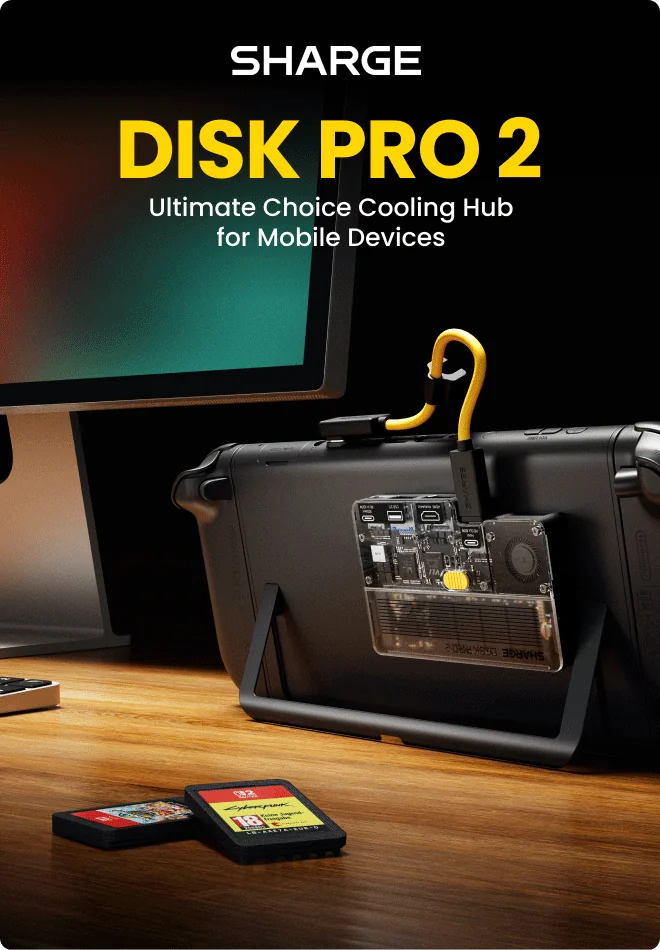
Disk Pro 2 combines the SSD enclosure, hub electronics and cooling fan in one transparent chassis.
The Better Idea Is Bring-Your-Own Storage
The most meaningful redesign is the move away from fixed internal storage. Disk Pro 2 supports user-installed M.2 SSDs in 2230, 2242, and 2280 sizes, with a stated maximum capacity of 8TB. That lets the buyer choose a drive according to capacity, endurance, performance, and budget rather than accepting a preselected module.
This modular approach also gives the enclosure a longer useful life. The drive can be changed as storage needs evolve. SHARGE describes it as secured by one Torx screw, although installation time will depend on the user and drive.
Support for an 8TB SSD does not escape the interface limit. Disk Pro 2 uses a 10Gbps USB 3.2 Gen 2 connection. Practical throughput remains below the theoretical 1.25GB/s signalling rate and varies with the SSD, host, cable, controller overhead, file type, and workload.
That ceiling is not necessarily a flaw. It is a design boundary. Disk Pro 2 is aimed at a compact USB-C workflow, not at replacing a Thunderbolt enclosure for someone whose priority is the highest possible sequential speed. I would choose it for the combined utility of storage, cooling, cards, display, and power, not for benchmark leadership.
A Swappable SSD Changes the Product’s Lifespan
Replaceable storage changes how the product can age. If the hub functions remain useful, the owner can change the SSD without replacing the entire device. It also makes capacity a separate purchasing decision, which is valuable for anyone who already knows the type of NAND, endurance rating, or brand they prefer.
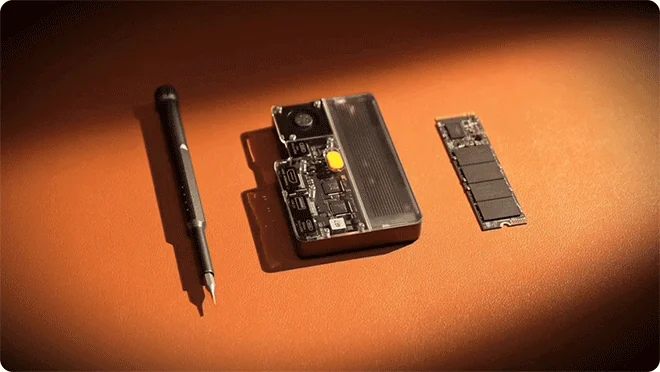
The modular design lets the owner select and later replace a compatible M.2 SSD.
Before choosing a configuration, verify that the intended SSD matches the current compatibility list. The documented 2230, 2242, and 2280 sizes describe physical form factors, but buyers should still confirm interface type, power requirements, capacity support, and whether a particular campaign offering includes a drive or is enclosure-only.
Six Ports Turn the SSD Enclosure Into a Mobile Workstation
Disk Pro 2’s six connections are useful because they map to a recognisable workflow. The two USB-C ports cover the host/data and power roles, USB-A accommodates a legacy peripheral, HDMI connects a monitor or television, and the SD and microSD slots handle common camera and drone media. SHARGE lists card-reader speeds up to 180MB/s read and 120MB/s write, subject to the card and host.
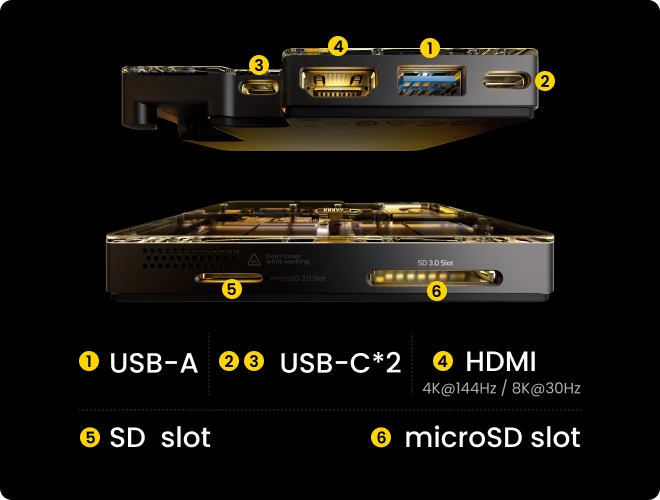
The six-port layout covers USB-C, USB-A, HDMI, SD and microSD in the same enclosure.
The documented power arrangement accepts up to 100W input and provides up to 80W to the host. That is not a promise every device will receive 80W; the charger, cable, host negotiation, SSD, peripherals, and total load affect the result.
From Camera Card to SSD Without a Full Desk Dock
Consider a photographer finishing a shoot away from the studio. With Disk Pro 2 attached to a USB-C laptop, the photographer can insert an SD card, copy selected files to the installed M.2 SSD, connect power, and keep a USB-A accessory available. The same small unit remains the project drive when the photographer returns to a larger display.
A mobile video creator has a different version of the same problem. A compatible phone can sit against the magnetic back while the SSD holds footage, the card reader ingests media, and HDMI sends a preview to an external screen. Published demonstrations show phone mirroring, card transfers, and television output, but exact simultaneous behaviour still depends on the host device and selected Disk Pro 2 configuration.
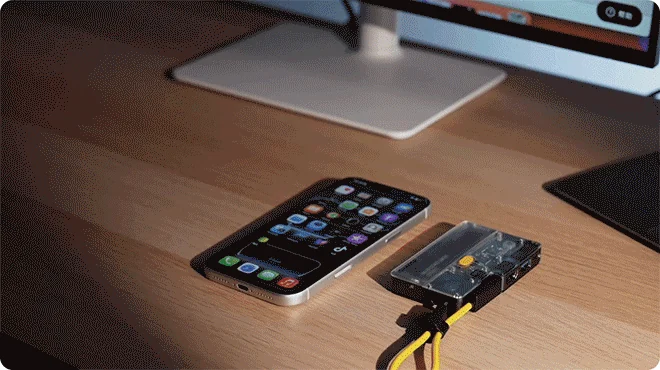
The compact format is intended to keep expandable storage and ports beside a USB-C phone.
This is what makes the product compelling to me. The familiar functions reduce the separate drives, cables, and adapters that must stay organised while files are moving.
HDMI Is Useful, but the Variant Matters
SHARGE lists HDMI 2.1 output up to 4K at 144Hz or 8K at 30Hz for the applicable configuration. Those figures describe the port ceiling, not a guarantee that every phone, laptop, cable, display, resolution, colour format, and refresh-rate combination will reach it.
The available product material also refers to different Disk Pro 2 configurations, including distinctions around HDMI and card-reader capabilities. Check the exact Lite or Ultra specification before choosing. If high-refresh 4K output or both card slots are central to the purchase, the variant name alone is not enough; the current port matrix should be the deciding reference.
Active Cooling Is Central, Not Decorative
Putting an SSD inside a pocket hub creates a thermal problem that an ordinary passive dock does not have to solve. Disk Pro 2 places an active fan beside the drive and provides off, automatic, and turbo behaviour. In automatic operation, the fan responds to temperature; turbo is intended for sustained, demanding transfers.
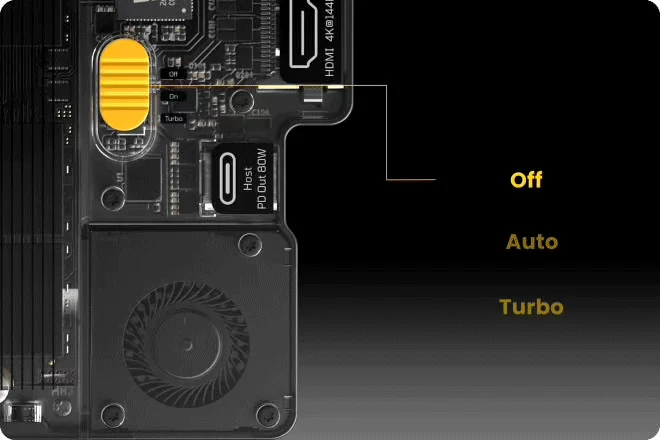
Cooling can be disabled, temperature-controlled automatically or switched to turbo for heavier transfers.
SHARGE says its Ice-Storm cooling system can reduce SSD temperature substantially and describes a large mixed-file transfer in which the drive remained below a stated threshold. Those are brand test results, so they should be treated as an indication of design intent rather than a universal outcome. SSD model, enclosure load, room temperature, airflow, file mix, and host activity can all change the result.
Long writes, repeated card ingests, video editing, and concurrent hub activity can generate heat. Moving air gives the controller another way to manage it. Review demonstrations report stable operation on particular samples, although their methods and hardware differ.
The trade-off is noise and complexity. A fan is a moving part, and turbo operation will be more noticeable than a passive enclosure. Someone recording audio beside the device or building a silent desk may prefer to leave the fan off for lighter tasks and reserve active modes for heavy transfers. Someone regularly moving hundreds of gigabytes may consider that a reasonable exchange.
What the Thermal Claims Do and Do Not Prove
Active cooling does not make every compatible SSD equally fast, nor does it remove the 10Gbps interface ceiling. It is better understood as a way to support more consistent operation when the installed drive and other hub components are producing heat.
I would also avoid treating cooling claims as a promise about drive lifespan or data safety. Those outcomes depend on more than enclosure temperature. The useful, defensible point is narrower: Disk Pro 2 includes controllable airflow around the SSD, while most small hubs do not contain an SSD or a dedicated fan at all.
The Magnetic, Detachable Design Makes the Mobile Case Stronger
Disk Pro 2 keeps the transparent visual style associated with SHARGE’s storage products, but the practical changes matter more than the exposed electronics. The magnetic back is designed to sit against a compatible phone, and adhesive magnetic rings are described for devices without a matching magnetic surface. This keeps the hub and phone together instead of leaving the enclosure to swing from the USB-C port.
The removable lanyard cable solves another mundane problem. A fixed lead can be awkward when it is too short, damaged, or routed poorly for a particular stand. Disk Pro 2’s supplied cable is described as a full-copper connection supporting data and power, while the detachable format gives the owner a replaceable part rather than a permanent failure point.
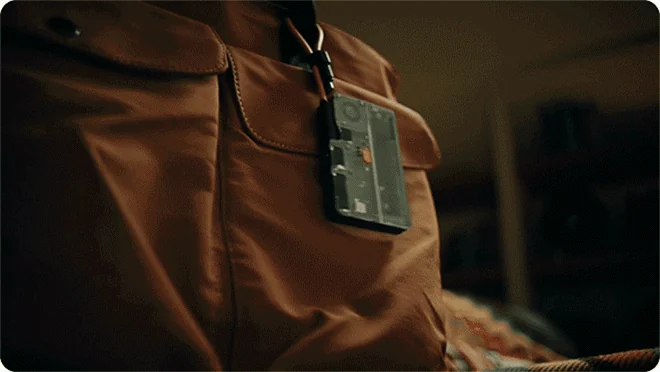
The removable lanyard-style cable doubles as a convenient way to keep the compact hub close.
Device compatibility still deserves a check. Magnetic alignment does not guarantee that every phone case will hold securely, and USB-C hardware varies widely in its support for external storage, display output, charging, and simultaneous accessories. The design is strongest when the host already supports the functions the user expects to consolidate.
Who Should Consider Backing Disk Pro 2?
I would put three groups at the front of the queue:
- Mobile photographers and video creators who ingest SD or microSD media, edit from external storage, and sometimes use a larger display.
- USB-C laptop users who want a chosen M.2 SSD, HDMI, charging, and a few essential peripherals in a compact desk or travel kit.
- Phone-based creators and power users who value magnetic attachment and want storage plus ports without carrying a separate hub and enclosure.
Disk Pro 2 is a weaker match for someone who needs Thunderbolt-class storage, Ethernet, several desktop displays, a large set of USB peripherals, or completely silent passive operation. It also asks the buyer to understand the chosen M.2 SSD and the differences between product configurations. A turnkey external drive will be simpler for a person who does not want those decisions.
My conditional verdict is positive. If you already carry both an SSD enclosure and a compact USB-C hub, Disk Pro 2 has a credible chance to replace both while adding card readers, active cooling, and magnetic mounting. If the SSD function is only occasional, a conventional hub and a separate drive may remain more flexible.
What to Verify Before Choosing a Configuration
Before committing, check the current product table for:
- the exact Lite or Ultra port set and HDMI version;
- inclusion and rated speeds of the SD and microSD readers;
- supported M.2 sizes, interface types, capacities, and SSD power requirements;
- whether the selected offering includes an SSD;
- magnetic rings or other mounting accessories in the package;
- host-device support for storage, video output, and power pass-through;
- charger and cable requirements for the desired power level;
- shipping coverage, warranty terms, returns, and regional support.
Crowdfunding involves specification and fulfilment uncertainty that ordinary retail does not. The sensible approach is to evaluate the current configuration rather than rely on an early demonstration or assume every version contains the same hardware.
SHARGE Disk Pro 2 FAQ
Does Disk Pro 2 include an SSD?
Disk Pro 2 is designed for user-installed M.2 storage, but SSD inclusion can depend on the selected configuration. Confirm the contents before choosing. Do not assume that support for capacities up to 8TB means an 8TB drive is supplied.
Which M.2 SSD sizes does it support?
The documented form factors are M.2 2230, 2242, and 2280, with stated capacity support up to 8TB. Check the current compatibility list for interface, drive, and capacity restrictions.
How fast is the storage connection?
The SSD data path is rated at 10Gbps over USB 3.2 Gen 2. Actual speed will be lower and depends on the installed SSD, host, cable, controller overhead, thermals, and workload.
Can it charge a laptop or phone while in use?
The power system is described as accepting up to 100W and providing up to 80W to the host. Actual delivery depends on the charger, cable, host negotiation, attached hardware, and total power consumption.
Is the cooling fan always on?
No. The documented controls include off, automatic, and turbo operation. Automatic mode responds to temperature, while turbo is intended for heavier workloads. Fan noise should be expected when active.
Can it connect to a 4K monitor?
The applicable HDMI 2.1 configuration is advertised for output up to 4K at 144Hz or 8K at 30Hz. Confirm the selected Disk Pro 2 version and make sure the host, cable, and display support the intended resolution and refresh rate.
Is SHARGE Disk Pro 2 Worth Considering?
Disk Pro 2 makes the most sense as a consolidation tool. Its bring-your-own M.2 storage, six useful connections, active cooling, magnetic back, and detachable cable address a specific mobile-work problem rather than chasing an arbitrary port count.
I would consider it for a creator kit or compact USB-C workstation where storage is used every day and card ingest or display output is also common. Readers who fit that profile can review the current Disk Pro 2 campaign details and compare the available configurations with the checklist above.
Disclosure: This article contains an affiliate link. We may earn a commission at no extra cost to you.